
Download TweakIE9 – Free Internet Explorer 9 Tweaker Tool
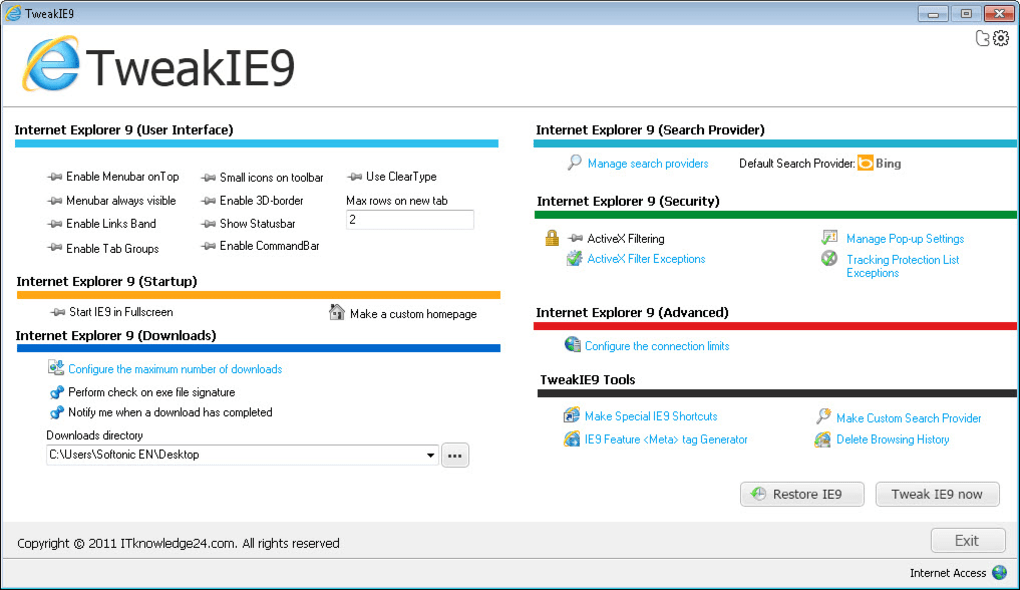
TweakIE9 is a lightweight utility designed to give power users full control over hidden settings in Internet Explorer 9. While IE 9 already includes many configuration options, they are scattered across the Advanced tab, registry hacks, and obscure dialogs. TweakIE9 centralises these tweaks in a clean, eye‑catching interface, allowing you to enable the classic menubar, adjust the maximum number of simultaneous downloads, manage search providers, and even create shortcuts that launch IE 9 in InPrivate mode or without add‑ons. The tool is completely free, does not require an internet connection after download, and includes a one‑click “undo” feature that restores the original configuration if something goes wrong. Whether you are a web developer needing a predictable testing environment or a power user who simply wants a faster, more personalised browsing experience, TweakIE9 streamlines the process and eliminates the need for manual registry edits.
Key Features
- Enable or disable the classic menu bar on the top of IE 9.
- Configure the number of parallel downloads (default is 6).
- Manage search providers – add, remove, or set a default provider with a single click.
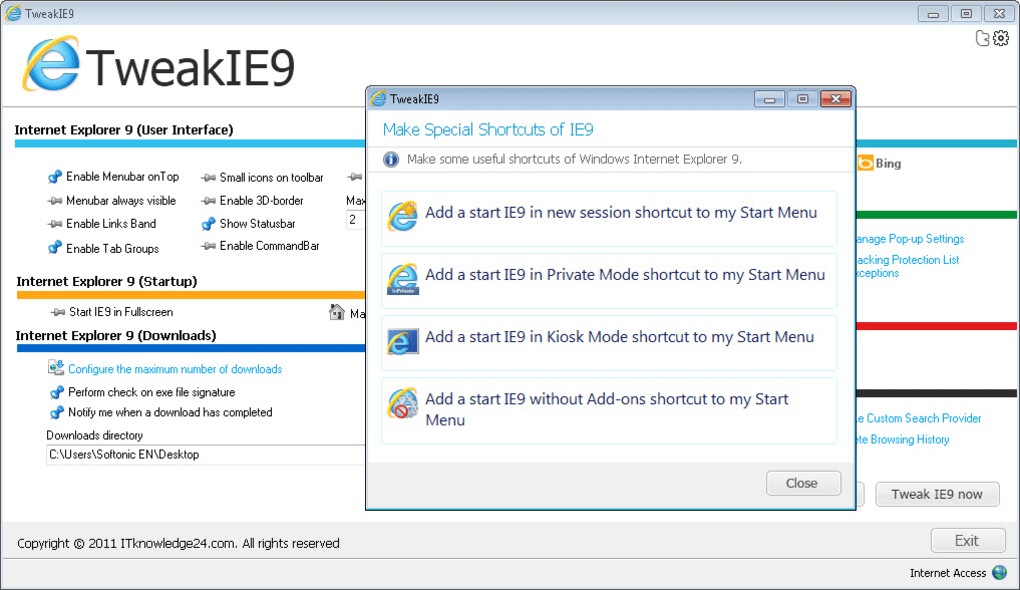
- Create custom shortcuts for launching IE 9 in InPrivate mode, without add‑ons, or with specific command‑line arguments.
- One‑click “Undo” button that reverts all changes made through the utility.
- Clean, modern UI that highlights each option with a brief description.
- Support for Windows 7, Windows 8, and Windows 10 (IE 9 compatibility mode).
- Zero‑bloat – the installer is under 2 MB and does not install additional services.
Installation & Usage Instructions
Getting TweakIE9 up and running is straightforward, even for users with limited technical background. Follow these steps to ensure a smooth installation and immediate access to the hidden IE 9 settings:
- Download the installer: Click the Download TweakIE9 button on the official page. The file is a self‑extracting
.exepackage, typically namedTweakIE9_Setup.exe. - Run as administrator: Right‑click the installer and select “Run as administrator”. This grants the program the necessary privileges to edit IE 9’s registry keys.
- Accept the license: The installer presents a standard EULA. Click “I Agree” to continue.
- Choose the installation folder: The default location (C:\Program Files\TweakIE9) works for most users. You may change it if you prefer a custom path.
- Complete the installation: Click “Install”. The process takes less than a minute, after which you’ll see a confirmation dialog.
- Launch TweakIE9: An icon appears on the desktop and in the Start menu. Double‑click to open the main window.
- Navigate the UI: The left pane lists categories (General, Downloads, Search, Shortcuts). Selecting a category displays toggle switches, sliders, or text fields on the right.
- Apply changes: Adjust a setting and click the “Apply” button. Most tweaks take effect instantly; some may require a browser restart.
- Undo if needed: If a change produces unexpected behaviour, click the “Undo All” button at the bottom of the window. TweakIE9 restores the original registry values and IE 9 settings.
Because the utility does not modify system files beyond IE 9’s configuration, it coexists peacefully with other browsers and security software. For best results, keep a backup of your favourite IE 9 profile before making extensive changes.
Compatibility, Pros & Cons, and Frequently Asked Questions
Compatibility
TweakIE9 is built specifically for the Windows environment that supports Internet Explorer 9. The application runs on the following operating systems:
- Windows 7 (32‑bit and 64‑bit)
- Windows 8 / 8.1 (32‑bit and 64‑bit)
- Windows 10 (when IE 9 compatibility mode is enabled)
It does not support Windows XP, Windows Vista, or non‑Windows platforms such as macOS, Linux, Android, or iOS. The tool also requires that Internet Explorer 9 be installed; it will not work with later versions of Edge or the legacy IE 11 without compatibility mode.
Pros & Cons
- Pros
- Free and lightweight – under 2 MB download size.
- Intuitive UI eliminates the need for manual registry edits.
- One‑click undo provides a safety net for experimentation.
- Allows creation of custom shortcuts, enhancing workflow efficiency.
- Works on all supported Windows versions that run IE 9.
- Cons
- Limited to Internet Explorer 9; no support for newer browsers.
- Documentation is minimal – users must rely on on‑screen tooltips.
- Some advanced tweaks lack detailed explanations, which may confuse beginners.
FAQ
Is TweakIE9 safe to use on a production machine?
Yes. The utility only modifies IE 9’s registry keys and does not affect system files. However, it is recommended to create a system restore point or back up your IE 9 profile before making extensive changes.
Can I revert individual changes instead of using the global “Undo All”?
TweakIE9 currently offers only a global undo feature. For individual reversions, you must manually change the setting back or reinstall IE 9’s default configuration.
Does TweakIE9 work with Windows 10’s “IE Mode” in Edge?
No. TweakIE9 interacts directly with the legacy IE 9 engine and cannot modify Edge’s IE Mode settings. For IE Mode, use Edge’s built‑in configuration tools.
Will the tool affect other browsers like Chrome or Firefox?
No. TweakIE9 only edits IE 9-specific registry entries, leaving Chrome, Firefox, and other browsers untouched.
How often is TweakIE9 updated?
Since IE 9 is a legacy product, updates are infrequent. The developer releases patches mainly for bug fixes or compatibility with newer Windows updates.
Conclusion – Make IE 9 Work the Way You Want
If you rely on Internet Explorer 9 for legacy web applications or internal tools, TweakIE9 offers a secure, free, and user‑friendly way to unlock hidden configuration options without diving into the registry yourself. The clean interface, one‑click undo, and shortcut creation features make it an essential companion for power users who want to fine‑tune performance, privacy, and usability. Download TweakIE9 today, follow the simple installation steps, and start customizing your IE 9 experience immediately. Remember to keep a backup of your settings, and enjoy a more responsive, personalized browser that aligns with your workflow.







